 PrinterTag by ENRIC
Label printing software · Chrome & Edge
Labels from your online store in one click
Price, barcode and shipping labels straight from your Shopify, PrestaShop or WooCommerce products and orders. On your thermal printer or on A4 label sheets.
Coming soon to the Chrome Web Store. Free up to 50 labels a month, no account, no card.
Stop copying product data into label software
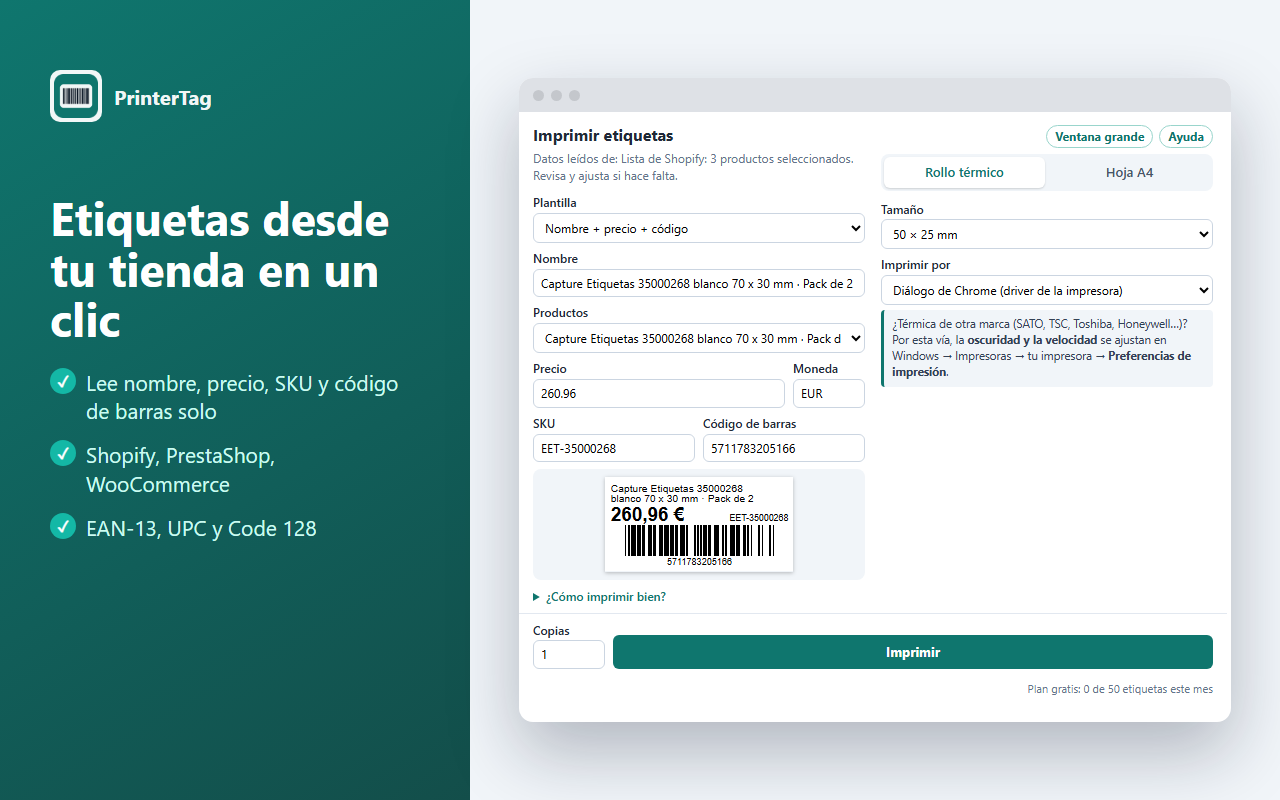
PrinterTag reads the product or order you have open and prepares the label. You check it and print.
Reads the data for you
Name, price, SKU and barcode from the product page, the product list or an order, with every variant.
Correct barcodes
EAN-13, UPC and Code 128. It warns you when an EAN check digit is wrong, before you print hundreds.
Orders and shipping
One label per unit sold, or a shipping label with the customer address, your sender details and the order barcode.
Thermal printers
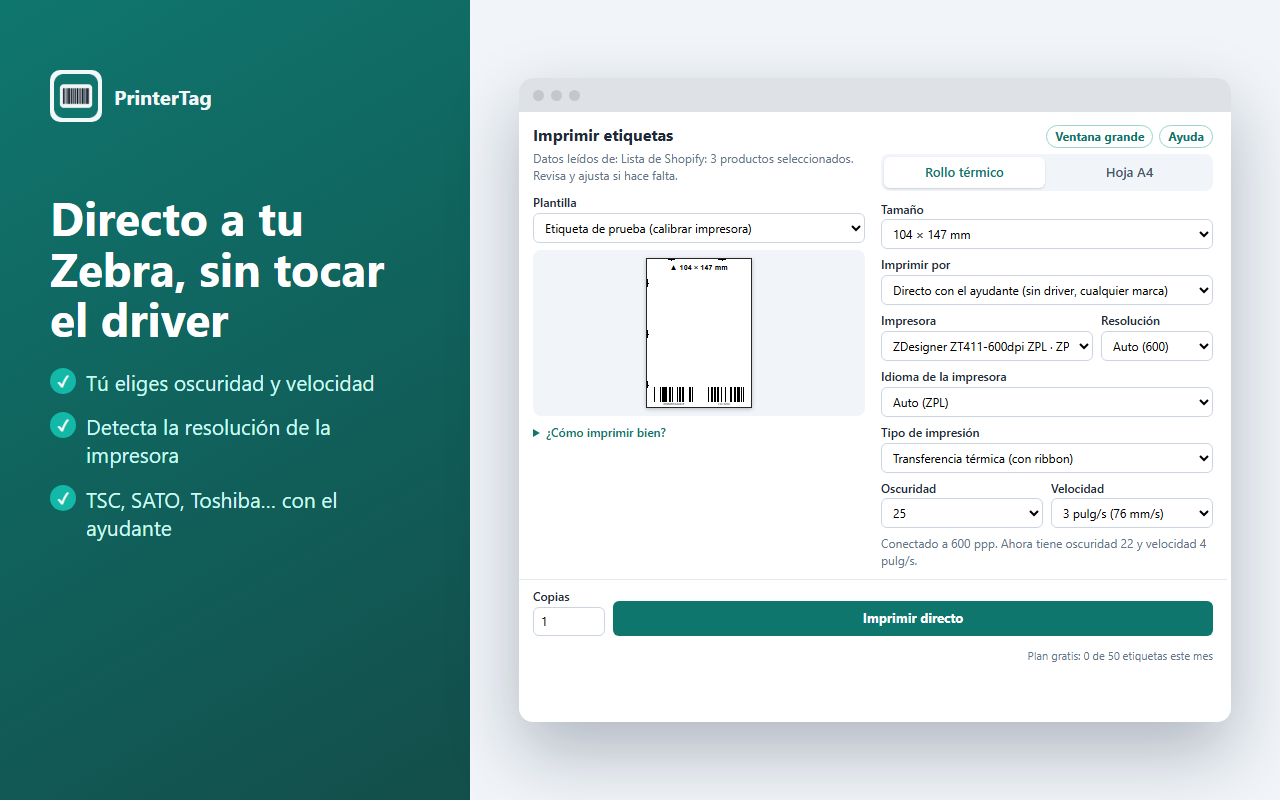
50×25, 100×50, 4×6", 104×147 mm or any custom size. Direct to Zebra without touching the driver.
A4 label sheets
Avery and compatible sheets on any laser or inkjet. Start at any label and fine-tune alignment to the millimetre.
Private
Your data never leaves your computer. No servers, no accounts, no tracking.
How it works
Three steps, the first time and every time.
- Open a product or an orderIn your Shopify, PrestaShop or WooCommerce admin, or in any store page.
- Click the PrinterTag iconThe data is already filled in. Choose the template and the label size.
- PrintOn your thermal printer or on an A4 sheet. The built-in visual guide shows each screen if you need it.
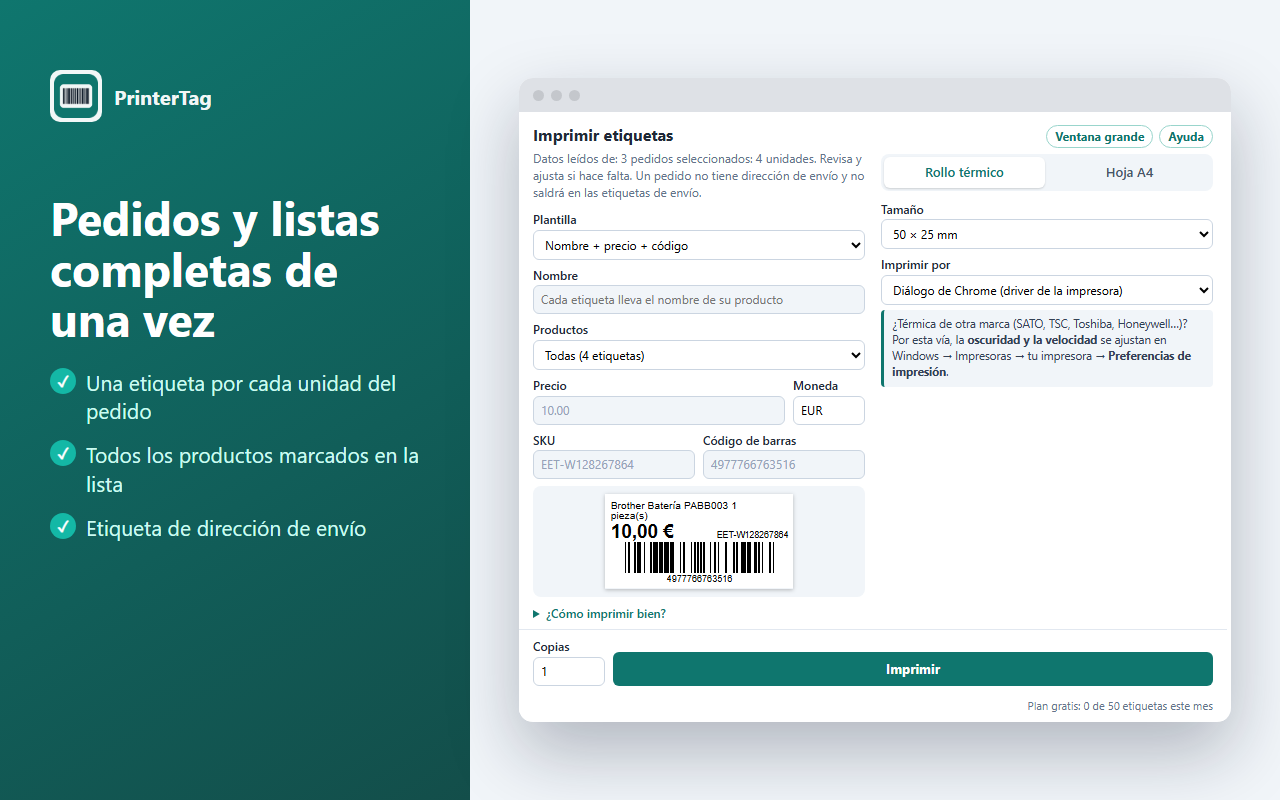
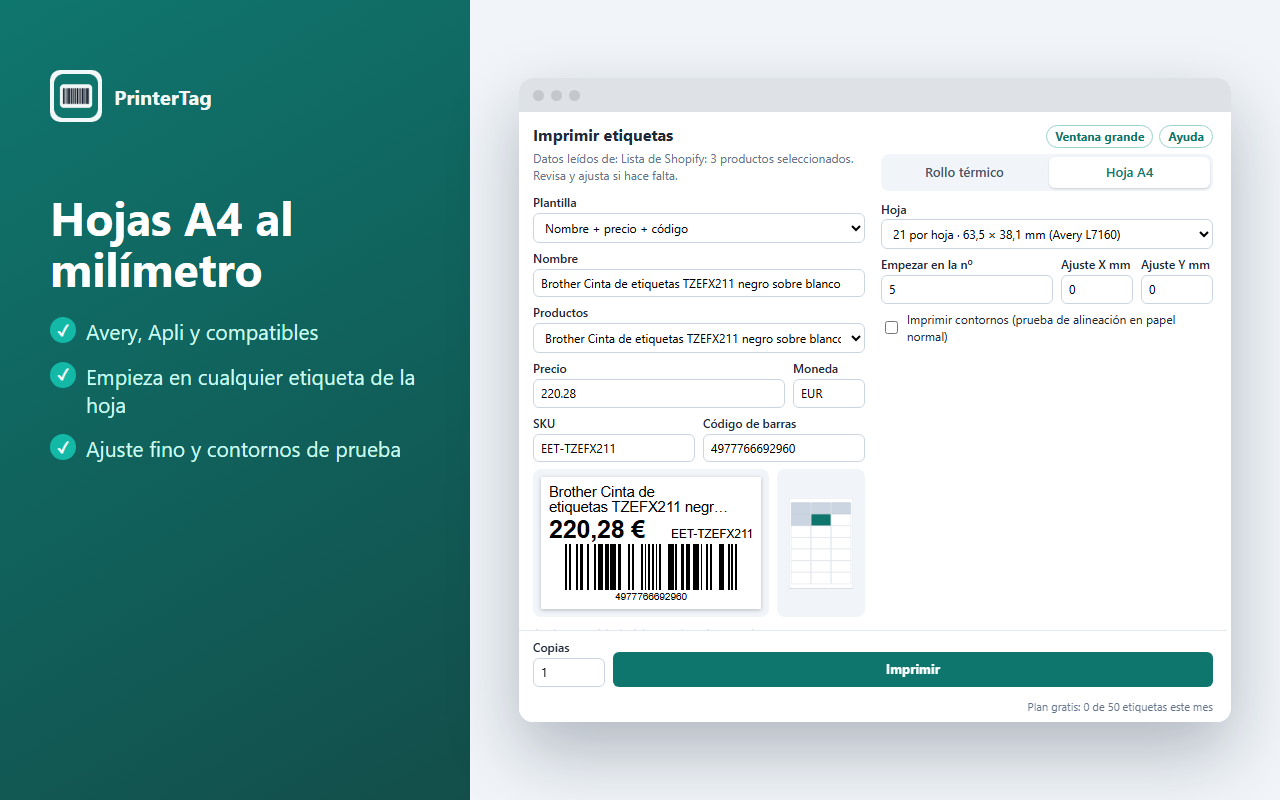
That easy, step by step
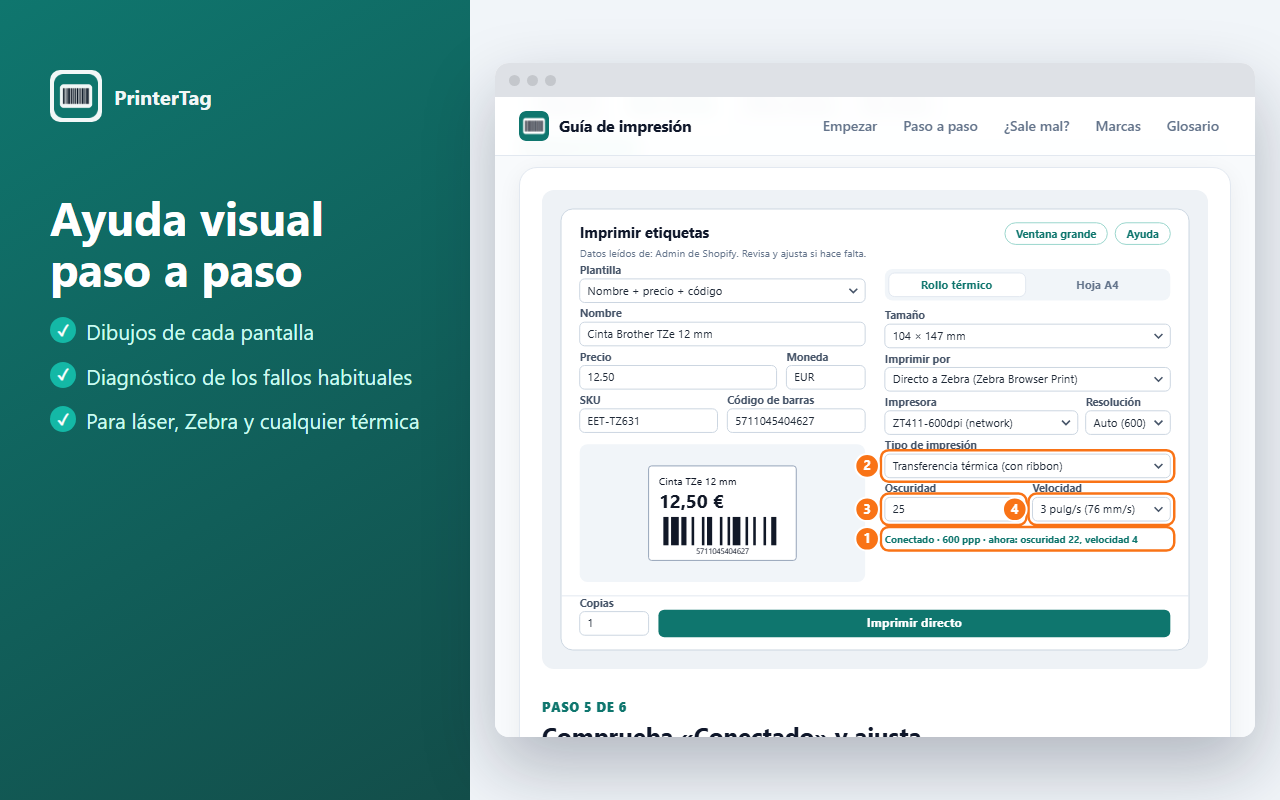
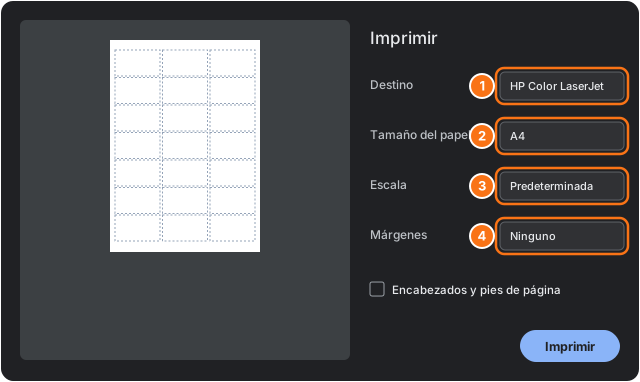
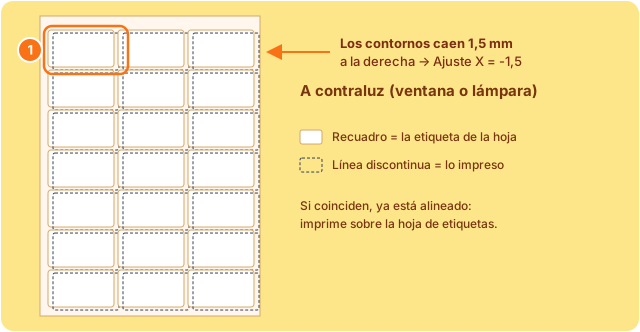
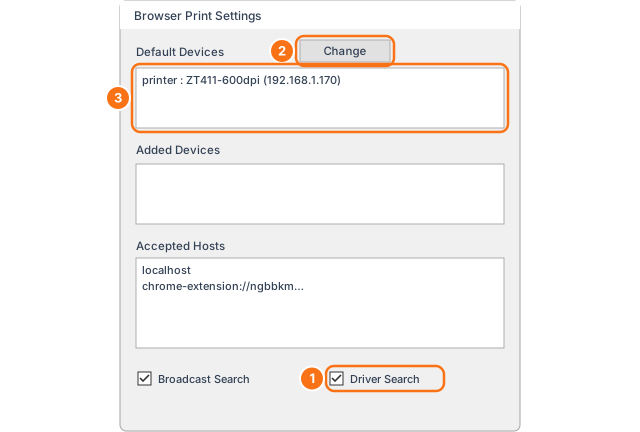
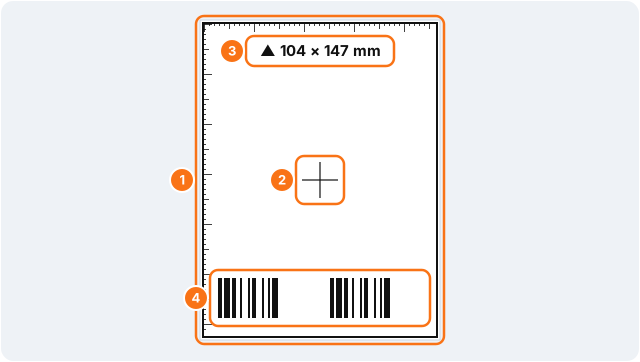
PrinterTag includes a visual guide with every screen drawn and numbered. Here are some of its steps (the extension is in Spanish for now).
Works with the printer you already have
Through your printer's driver, or directly in its own language for sharper labels and full control.
| Printer | How PrinterTag prints | What you need |
|---|---|---|
| Zebra | Directly (ZPL), with darkness and speed control | Zebra Browser Print (free, from Zebra) |
| TSC, SATO, Toshiba, Honeywell, Godex | Directly (TSPL or ZPL emulation) with the PrinterTag helper, or through the driver | Coming soon: the helper. Today: the printer's driver |
| Brother QL, Dymo and other thermal printers | Through the driver, at the exact label size | The label size set up in the driver |
| Laser or inkjet | A4 label sheets (Avery and compatible) | Nothing else |
What software do I need to print labels?
It depends on how many labels you print and where the data comes from. These are the usual options.
| Software | Best for | Price | Printers |
|---|---|---|---|
| BarTender | Industry and logistics: databases, automation, many printers | Yearly subscription, from USD 199/year (Starter) | Thermal printers of many brands and office printers (Windows) |
| ZebraDesigner | Zebra printer owners | Essentials free; Professional paid | Zebra only |
| Brand tools (P-touch Editor, DYMO Connect) | Small offices and warehouses | Free | Their own brand only |
| Avery Design & Print | A4 label sheets | Free, in the browser | Office printers, not thermal |
| PrinterTag | Online stores printing from their products and orders | Free up to 50 labels/month; Pro USD 4.99/month | Thermal printers of any brand and A4 sheets, in Chrome and Edge |
Prices checked on the vendors' websites in October 2026. They may change.
Simple pricing
Every feature in every plan. You only pay when you print a lot.
Free
- 50 labels a month
- All templates and printers
- No account, no card
Pro
or $39 / year (save 35%)
- Unlimited labels
- All templates and printers
- Email support
Prices in US dollars. Cancel any time.
Frequently asked questions
Getting started
What software do I need to print labels?
It depends on how many labels you print and where the data comes from:
- Industry and logistics (databases, automation, many printers): professional software such as BarTender or CODESOFT, sold as subscriptions.
- Zebra printers: ZebraDesigner Essentials is free for simple label design.
- Online stores wanting price, barcode or shipping labels straight from their Shopify, PrestaShop or WooCommerce products and orders: PrinterTag does it from the browser, with no templates to design, and is free up to 50 labels a month.
See the comparison with prices above.
What is PrinterTag and how does it work?
It is a Chrome and Microsoft Edge extension. Open a product or an order in your store, click the PrinterTag icon and the data (name, price, SKU, barcode, shipping address) is already on the label. Choose a template and size, check the preview and print.
No accounts and no template design: price, barcode and shipping labels are ready to use.
Which stores does it work with?
- Shopify: product page, product list (selected or all visible), orders and draft orders, with every variant. It reads the data with your own admin session.
- PrestaShop and WooCommerce: product fields in the admin panel.
- Any store that publishes product data in schema.org format, which most well-ranked stores do.
If a page has no data, you can type it in the extension.
Do I need to install anything else?
- For A4 sheets or printing through the printer driver: no, just the extension.
- For direct printing on Zebra: you need Zebra Browser Print, Zebra's free program for Windows and Mac (Zebra asks you to fill in a short form to download it). If it is missing, the extension gives you the link and the step-by-step guide.
- For direct printing on other brands (TSC, SATO, Toshiba, Honeywell): an optional PrinterTag helper for Windows is coming. Meanwhile, print through their driver.
Does it work on Microsoft Edge, Mac or Firefox?
PrinterTag is a Chrome and Microsoft Edge extension: both browsers share the same engine and extensions. It is tested on Windows; on a Mac it runs inside Chrome or Edge just like on Windows for driver and A4 printing.
Direct printing to Zebra uses Zebra Browser Print, which Zebra offers for Windows and Mac. The helper for other brands will be Windows only. Firefox and Safari are not available yet.
Printers and labels
Which printers does it work with?
- Thermal label printers of any brand (Zebra, TSC, SATO, Toshiba, Honeywell, Datamax, Godex, Brother QL, Dymo…) through their driver.
- Zebra direct, in its own language (ZPL), independent of the driver, with darkness and speed control. The extension detects the printer resolution (203, 300 or 600 dpi).
- Office laser or inkjet printers, with A4 label sheets.
It works with both thermal transfer (ribbon) and direct thermal printers.
Which label sizes can I use?
Rolls: 50×25, 40×30, 57×32, 62×29, 100×50, 4×6" (102×152) and 104×147 mm, or any size with the "Custom" option.
A4 sheets: the most common Avery and compatible formats: 8, 10, 14, 21, 24, 40 and 65 labels per sheet.
Which barcodes does it support?
EAN-13 and UPC-A for retail products, and Code 128 for SKUs, internal references or order numbers. If an EAN check digit is wrong, the extension warns you before printing.
With direct printing, each bar is snapped to the printer's exact dots so scanners read it well even at 203 dpi.
Can I print many labels at once?
- Variants: every size or colour of a product at once.
- Shopify product list: select the ones you want (or none, for all visible) and get one label each.
- Orders: one label per unit sold; 3 units of a product give 3 labels.
- Copies: the copy count multiplies every label.
Can I print shipping labels?
Yes. From a Shopify order or the order list, the "Shipping address" template prints the customer's address, your sender details (saved for next time) and the order number with its barcode. One label per order; orders without an address (local pickup) are skipped. You can also type an address by hand.
What is the difference between printing through the driver and direct?
Through the driver, PrinterTag prepares a page at the exact label size and the printer prints it with its Windows or Mac settings. It works with any brand, but size, darkness and speed are set in the driver.
Direct, PrinterTag sends the label in the printer's own language with the size, darkness and speed you choose, regardless of the driver settings. Sharper and fewer problems.
Troubleshooting
My label prints too light. What can I do?
Raise the darkness or lower the speed: in PrinterTag with direct printing, or in the driver preferences otherwise. With a ribbon, the print method must be thermal transfer. Illustrated troubleshooting (Spanish).
The label prints on a full page, too small or misaligned
It is almost always a missing label size in the driver, or Margins not set to "None" and headers not removed in the Chrome dialog. Direct printing avoids it. Illustrated troubleshooting (Spanish).
Can I use partly used A4 sheets?
Yes: "Start at label no." skips used labels, and the X/Y adjustment corrects in millimetres if the printer prints off-centre. A4 sheet steps (Spanish).
The scanner does not read the barcode
Use direct printing, which snaps bars to the printer resolution, and raise the darkness slightly. For long codes, choose a larger label. Illustrated troubleshooting (Spanish).
Pricing and privacy
How much does it cost?
It is free up to 50 labels a month, with every feature and no card. Pro, with unlimited labels, costs USD 4.99 a month or USD 39 a year. The extension tells you when you reach 50.
What happens to my data and my customers' data?
Nothing leaves your computer. PrinterTag reads the page only when you click its icon, draws the label locally and sends it to your printer. No PrinterTag servers, accounts, analytics or ads.
The first time, it shows a privacy notice before reading anything. Your customers' addresses remain your store's responsibility; PrinterTag only helps you print them. More in the privacy policy.
Which language is the extension in?
Spanish, for now. The website and the help guide are in Spanish and English.
Who makes PrinterTag?
ENRIC, the maker of focused tools for online stores such as Reversa and Larderia for Shopify. Questions or suggestions: hello@printertag.com.